

A11Y Assistant for Figma
A11Y Assistant is a BYOK Figma plugin for turning selected app frames into reviewable VoiceOver and TalkBack labels. It scans the frame image, reads the layer tree, applies accessibility rules, and writes approved labels back into Figma.
I built it after a manual Pocket FM accessibility pass across Android and iOS. Content Designer Sayan Das and I audited core journeys, touch targets, grouping, platform guidance, and the labels a listener would hear through a screen reader.
Design leadership comments on LinkedIn
This was a thoughtful initiative, Kishore. Keep building and championing our accessibility efforts so more listeners can experience entertainment in a truly accessible way. Really proud of this work.
Thanks to you and the team's efforts, Pocket FM is one of the leading apps for visually impaired users. This has been a very thoughtful initiative.
Can't wait to have you share more of the work we're doing 💙
Scan selected frames
Manual audit set the rules
We aimed for a usable starting point. A listener should be able to browse shows, start playback, understand controls, move across tabs, and avoid dead ends.
We looked at Netflix, Spotify, and YouTube because entertainment products repeat the same accessibility problems: posters need names, playback controls repeat across contexts, carousels create noisy focus paths, and tabs can sound identical if you label them from the layer tree alone.
Sayan and I turned that audit into ground rules, then added labels manually across Figma frames. That worked for a first pass. It also made the tooling gap obvious.
Rules for screen-reader labels
WCAG rules we used
I mapped the manual audit to WCAG 2.2 before I turned it into plugin behavior. A11Y Assistant repeats the label, grouping, reading-order, and target-spacing checks. A designer still reviews contrast, color-only cues, visual density, and anything that needs judgment.
Manual labeling did not scale
The manual pass gave us the rules. After that, pasting labels into frame after frame felt wasteful. A model could inspect the screen, apply those rules, and give the designer a reviewable first draft.
I built A11Y Assistant in Antigravity, Google's IDE. I wanted to try a different build environment and model workflow instead of staying inside my usual Claude and Codex loop.
The plugin uses a BYOK model. Paste an API key, select frames, scan, review the suggestions, and apply the labels back into Figma. The key point is review. The plugin proposes labels; the designer still decides what ships.
Prototype with Figma comments
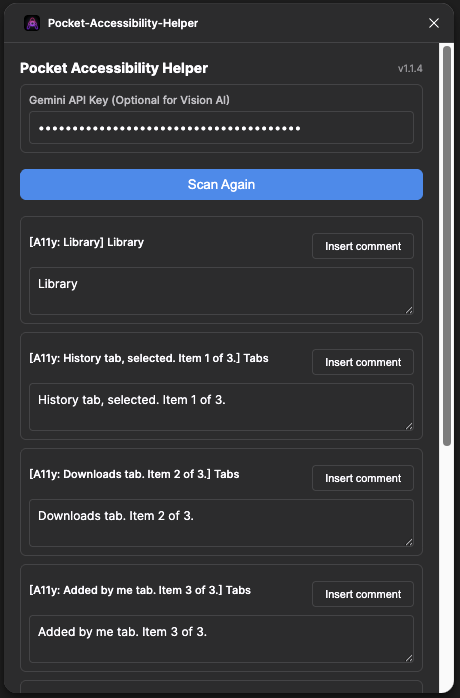
I started with a plain helper: Gemini key at the top, Scan Again, generated labels underneath, and an Insert comment button beside each item. It proved the model could help with the repetitive part.
Comments proved too temporary. The next build needed better grouping rules, frame context, manual override, provider flexibility, and a way to write labels as Accessibility annotations.
Frame image plus layer tree
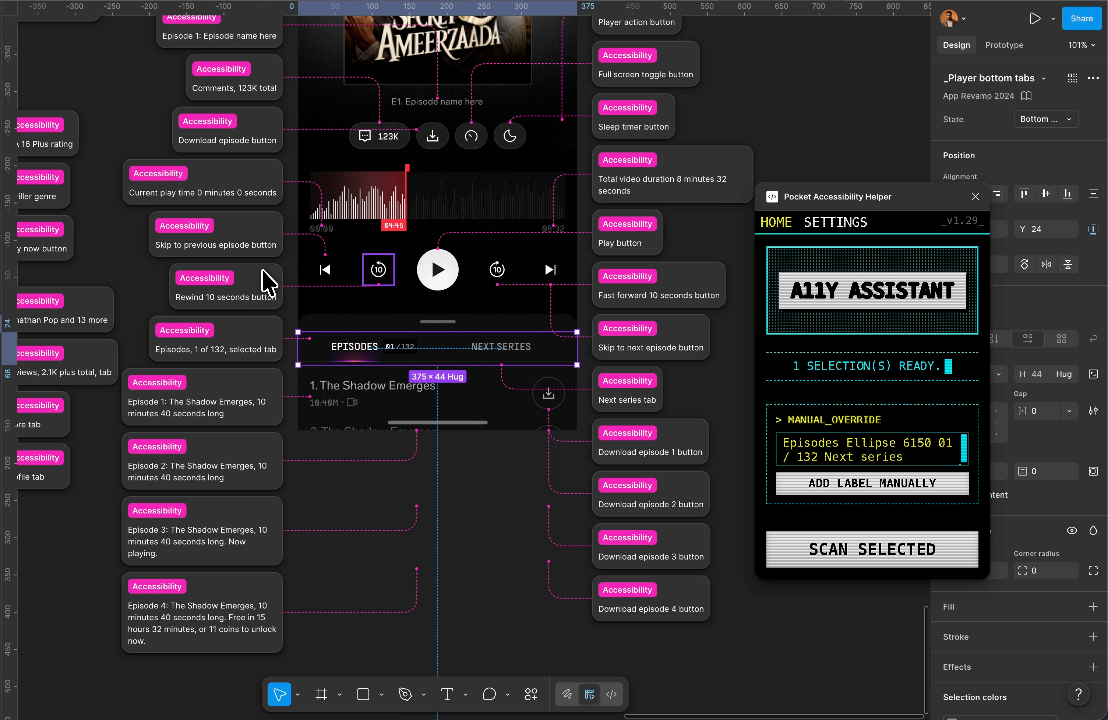
The code combines screenshots with structure. The screenshot gives the model visual context. The layer tree gives it names, text, node ids, and geometry. That mix helps it tell two identical icons apart, such as seek backward on the left of the play button and seek forward on the right.
Manual override stays available
The plugin does not need the model for every label. If there is no API key or an export fails, it falls back to the text and icon candidates it can read from the frame. If you select a single child node, the manual override lets you add a label without running a scan.
Repeatable accessibility workflow
A11Y Assistant helped turn the first Pocket FM accessibility pass into a repeatable workflow. Select frames, inspect the suggestions, fix the labels that need judgment, apply them as Accessibility annotations, and keep the rules close to the design file.
It did not replace a real accessibility audit. It made the next pass less blank. That was the useful part: we went from one manual cleanup to a tool that could start the next screen with context.